NexRide How to Play With Friends: City Riding Guide
NexRide how to play with friends: plan a city ride, learn bike controls, find the bike hub, and avoid police trouble while cruising with your Roblox crew.
Jump to
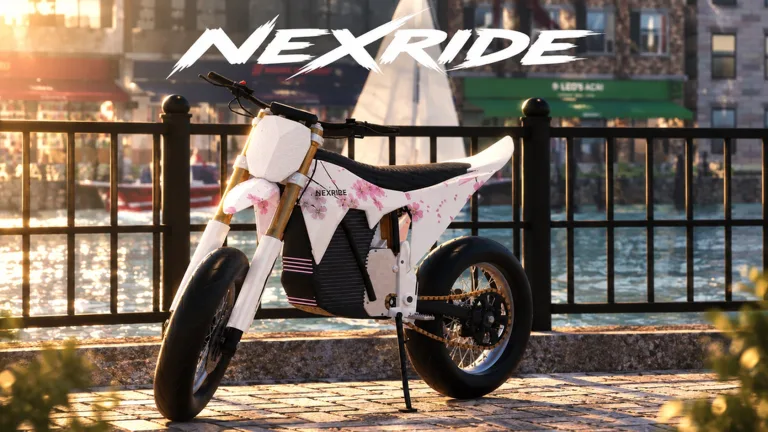
NexRide How to Play With Friends: Start Your Group Ride
Turn your next trip through NexRide’s city into a ride with your crew. NexRide how to play with friends starts with getting together in the same server and choosing a shared destination, giving everyone a reason to explore together. This NexRide how to play with friends guide walks you through getting your bike moving, planning a meetup, and keeping traffic trouble from breaking up the ride.
NexRide is a Roblox motorcycle game built around riding, customization, earning money, and exploring an active city. Riding with friends is part of that experience, and each server holds up to 16 players.
Start with a simple plan: meet at the bike hub, get everyone ready, and take a cruise through the streets. Give new riders time to learn their bikes before turning the outing into a speed run.
| Session detail | NexRide information |
|---|---|
| Platform | Roblox |
| Developer | Funspace Studio's |
| Maximum server size | 16 players |
| Group activity | Ride through the city with friends |
| Riding environment | City streets with working traffic |
| Bike options | Performance upgrades and customization |
Open NexRide on Roblox to start playing. Once your group is together, agree on where to meet before everyone heads in different directions.
Use this opening checklist:
- Choose a shared destination.
- Make sure everyone can start and control their bike.
- Give riders time to charge or customize.
- Agree whether the outing is a relaxed cruise or a money-making session.
Keep the opening ride manageable. Explore a short stretch of streets, regroup, and then decide where to go next. That gives everyone room to learn without making the entire session depend on keeping up with the fastest bike.
Get Everyone’s Bike Ready Before Leaving
The practical part of NexRide how to play with friends begins before your group leaves its meeting point. A rider who is still figuring out the key or kickstand needs a moment to get moving.
On keyboard, the main key and phone are central to getting around. The phone gives you access to the garage and map, while the key helps you prepare your motorcycle to ride.
| Control or action | What to do |
|---|---|
| Equip the main key | Press 1 |
| Use the main key | Select it and use it on your bike |
| Raise the kickstand | Click the kickstand |
| Open the phone | Press T |
| Access the garage | Open the garage through your phone |
| Find the bike hub | Open the phone’s map and start a route |
Work through the startup sequence while everyone is still together:
- Equip your main key. Press 1 on keyboard.
- Use the key on your bike. Complete that interaction before trying to ride away.
- Raise the kickstand. Click it to prepare the bike for riding.
- Check your handling nearby. Practice moving and turning before following the group into traffic.
- Open your phone when you need navigation. Use the map to set a route toward the bike hub.
NexRide uses realistic bike physics, and careless riding can tip your motorcycle. Ease into turns and leave space around other riders while learning how your bike responds.
Bikes also handle differently. When you switch motorcycles, take a moment to get familiar with the new ride instead of assuming it will feel identical.
Sports mode makes your bike faster. Keep the group’s pace comfortable for everyone, especially when some riders are learning the controls. Use extra speed deliberately; racing away from the meetup makes coordinating the next turn harder.
Before leaving, ask whether anyone still needs their garage or map. Finish those checks together so the group can focus on riding once it reaches the street.
Use the Bike Hub as Your Meeting Point
The bike hub gives your group a useful destination because it brings several motorcycle activities into the same outing. You can head there to customize your bike, and charging is available there too.
For NexRide how to play with friends, use the hub as a place to regroup between rides. It gives everyone a clear location to aim for while handling their own bike setup.
Press T to open your phone, open the map, and start a route to the bike hub. Follow the route while paying attention to traffic signals and road signs.
Once you arrive, organize the stop around what each rider needs:
- Charge before the next outing. Handle battery needs while everyone is already stopped.
- Customize your motorcycle. Change your setup and give your bike its own look.
- Consider performance upgrades. NexRide supports upgrading bike performance.
- Practice after making changes. Get comfortable with your ride before returning to busier streets.
Turn customization into part of the social session. Compare everyone’s bikes, check out different styles, and pick the next destination while the group finishes preparing.
Keep riding pace separate from appearance. A matching look can be fun, but bikes can feel different on the road. Leave room for those differences instead of expecting every rider to accelerate, turn, and stop together.
Use your phone’s garage when you need to bring your bike back home. After buying a motorcycle, the garage is also where you can access the new bike.
Make the meetup a pause with a purpose: charge, adjust, regroup, then head out. That rhythm gives your session structure while leaving plenty of room to explore.
Earn Money While Riding With Your Crew
A NexRide how to play with friends session can include earning cash as well as cruising. The game offers work, deliveries, wheelies, police escapes, and memecoin trading.
Choose an activity before leaving your meetup. If everyone has different plans, split the session into stretches: ride together, handle individual money-making activities, and meet again afterward.
| Money-making activity | How it works |
|---|---|
| Work | Earn money through jobs |
| Deliveries | Complete deliveries for money |
| Wheelies | Earn money while performing wheelies |
| Police escapes | Earn money by escaping a pursuit |
| Memecoin trading | Trade memecoins as another way to build wealth |
Wheelies reward riding skill, with longer wheelies earning more money. Practice them with space around you, and focus on controlling the bike before trying to extend every attempt.
Keep stunt practice separate from a traffic-heavy group cruise. Concentrating on a wheelie while trying to follow friends, watch signals, and avoid police adds several things to manage at once.
For work and deliveries, let everyone handle their own activities and choose a meetup afterward. Keep track of what you personally earn so you can decide which bike changes to pursue.
Memecoin trading adds another money option, but prices can move up or down. Keep your riding plans centered on activities you want to do together rather than depending on a trade increasing in value.
Claim the Available Cash Codes
As of October 23, 2026, these codes provide cash and a temporary cash boost:
| Code | Reward |
|---|---|
100KVISITS | 2.5K Cash |
200KVISITS | 3K Cash and 2x Cash for 15 minutes |
Open the store, select CODES, enter the code in the ENTER CODE box, and click REDEEM. Enter the codes exactly as written because they are case-sensitive.
Get your bike ready before redeeming the timed boost. Finish your meetup and customization first so you can spend its 15 minutes riding.
Joining the game’s Roblox group also provides 1,000 cash. Use the extra money toward your bike plans, and keep enough attention on the road to avoid immediately losing cash to a fine.
Keep Police Trouble From Breaking Up the Ride
Traffic rules matter in NexRide. Running red lights and riding recklessly can trigger a police pursuit, turning a relaxed outing into a chase.
For NexRide how to play with friends, make traffic awareness part of the group plan. Watch each signal yourself instead of following another rider through an intersection automatically.
Stop at red lights, move when the light is green, and pay attention to stop signs. Leave space between bikes so everyone can react to traffic without crowding the rider ahead.
Police pursuits offer a money-making opportunity if you escape, but getting caught brings fines and can result in your bike being taken. A capture can cost 200 cash, so a chase can also eat into what you have earned.
Use these habits during a shared ride:
- Let the group spread out at intersections. Regroup after everyone crosses safely.
- Leave room around police vehicles. Avoid riding directly into them.
- Keep speed under control. Reckless riding can attract police attention.
- Prioritize handling during a pursuit. Save wheelie practice for a calmer stretch.
- Choose a place to meet again. Give separated riders a clear destination.
If someone gets caught, pause the shared plan and regroup once they are ready to ride again. Use that break to check your own charge or open the map for the next destination.
Decide whether you want police chases to be part of the outing before deliberately taking risks. A relaxed cruise, a customization stop, and a pursuit-focused session ask different things of your riders.
Build your evening around a repeatable loop: meet at the hub, prepare your bikes, ride through the city, and return when someone needs charging or adjustments. Add deliveries, wheelies, or faster riding as the group gets comfortable.
The enjoyable part is having enough coordination to stay connected while everyone develops their own style. Give each rider room to learn, respect the traffic around you, and keep a shared destination in mind.
FAQ
NexRide How to Play With Friends: What Can We Do Together?
Ride through the city together, meet at the bike hub, and compare your customized motorcycles. You can also organize your session around individual work or deliveries, then regroup for another cruise. Choose a destination and pace before setting off.
How Many Players Can Fit in a NexRide Server?
NexRide supports up to 16 players per server. Keep that limit in mind when organizing your group, and agree on a meeting point once everyone is together.
How Do I Start My Bike on Keyboard?
Press 1 to equip your main key, use it on your bike, and click the kickstand to raise it. Press T when you need your phone for the garage or map. Practice controlling the bike before heading into traffic.
Where Can Friends Meet to Customize and Charge Their Bikes?
Use the bike hub as your shared destination. Open your phone’s map and start a route there. Handle customization and charging during the stop, then regroup before beginning your next ride.
Continue with
 NexRide Player Limit: Server Size and Riding TogetherThe NexRide player limit is 16 per server. Plan your group ride, understand server capacity, and prepare to explore the city with friends on Roblox today.
More in Features
NexRide 2x Cash: Free Boost Code and Game Pass Guide
Get NexRide 2x cash with a free boost code or the permanent game pass. Compare rewards, check the Robux price, and plan your money-making riding session.
NexRide AI Cops: Chase Triggers, Fines, and Escape Tips
Learn how NexRide AI Cops react to reckless riding, what happens when you get caught, and how to prepare your bike before risking a chase for extra cash.
NexRide Ambient Sounds: A Guide to City Exploration
Explore NexRide ambient sounds, working traffic, and city riding. Learn bike controls, route planning, and ways to enjoy a more relaxed cruise on Roblox.
NexRide Badges: Unlock Status and Player Reward Guide
Looking for NexRide badges? Check the current badge status, understand VIP and cash rewards, and plan your next ride with practical bike and money tips.
Continue exploring
Join the community
Official channels for news, updates and player help: