NexRide Ambient Sounds: A Guide to City Exploration
Explore NexRide ambient sounds, working traffic, and city riding. Learn bike controls, route planning, and ways to enjoy a more relaxed cruise on Roblox.
Jump to
What Are NexRide Ambient Sounds?
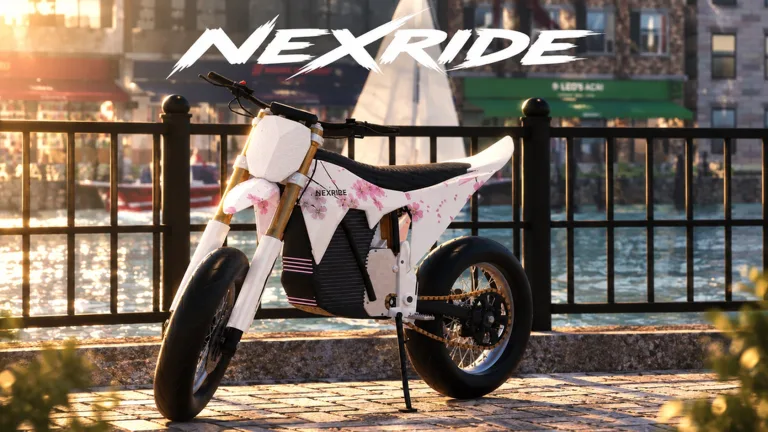
NexRide ambient sounds are part of what gives your ride a city to get lost in. Alongside working traffic and bike physics, they support the urban atmosphere that makes exploring worth your time between upgrades and money runs. To enjoy NexRide ambient sounds as part of that experience, take a cruise with room to explore instead of turning every trip into a chase.
NexRide is a Roblox riding game built around bikes, customization, earning money, and exploring a city. You can push your bike, ride with friends, complete deliveries, or spend time finding your way around. Environmental audio belongs to that broader city experience.
The appeal is the connection between those activities. A trip to customize your bike still takes you through streets with traffic. Riding with friends gives you a reason to explore together. Earning money gives your next purchase a purpose, while cruising lets you spend time enjoying the bike you already have.
| City feature | What it brings to your ride |
|---|---|
| Ambient sounds | Environmental audio within the city |
| Working traffic | Road activity during exploration |
| Realistic bike physics | A focus on how your bike handles |
| Bike customization | Performance upgrades and changes to your setup |
| Riding with friends | Shared exploration and social riding |
Think of NexRide ambient sounds as one part of the setting, alongside the roads, vehicles, and riding systems. Give yourself a destination, follow the streets, and leave enough breathing room to enjoy the trip.
You can start through the NexRide experience on Roblox. Once you're in, getting comfortable with your bike is the next step.
Get Your Bike Ready Before Exploring
A relaxed ride starts with knowing how to get moving. NexRide uses a main key and a kickstand as part of the bike setup, so take care of those before heading into traffic.
The phone also matters. It gives you access to your garage and maps, connecting your bike management with navigation around the city.
| Action | Control or interaction |
|---|---|
| Equip your main key | Press 1 |
| Use the key | Tap with the main key equipped |
| Raise the kickstand | Click the kickstand |
| Open your phone | Press T |
| Access your garage | Open the garage through your phone |
| Find a destination | Open maps on your phone and start a route |
Work through the setup in order:
- Press 1 to equip your main key.
- Use the key, then click the kickstand to raise it.
- Start riding and give yourself time to learn the handling.
- Press T when you need your phone.
- Use maps to set a route to the bike customization location.
Take corners carefully while you're learning. Your bike can tip, and different bikes handle differently. Buying another model means getting used to its behavior, rather than assuming it will feel identical to the bike you just left behind.
Sport mode is another consideration. It makes your bike faster, which changes how quickly you approach traffic lights, turns, and other vehicles. Leave yourself room to react before pushing your speed.
For a ride focused on NexRide ambient sounds and exploration, prioritize a pace you can manage comfortably. You still have the option to switch your attention to faster riding later.
Your garage gives you a way to bring your bike back home through the phone. Keep that option in mind when managing your ride, especially as you start buying and using different bikes.
Follow Traffic Rules to Keep Your Cruise Going
NexRide's working traffic comes with consequences for reckless riding. Road signs and traffic lights matter, and breaking the rules can bring the police into your trip.
That changes the rhythm immediately. Instead of following a route or exploring with friends, you're trying to escape while protecting your cash from fines.
If your goal is to spend time with NexRide ambient sounds and the city atmosphere, follow the traffic rules. Stop at red lights, move on green, and pay attention to stop signs along your route.
| Road situation | What to do |
|---|---|
| Red traffic light | Stop before proceeding |
| Green traffic light | Continue through the intersection |
| Stop sign | Stop and follow the road signs |
| Police vehicles nearby | Avoid riding into them |
| Fast or reckless riding | Reduce your pace to avoid attracting a chase |
Speed deserves particular attention. Reckless riding can attract police, so a cruise can turn into an escape attempt before you reach your destination. Control your pace approaching intersections instead of treating each stretch of road as a chance to accelerate.
Wheelies add another decision. You can earn money by performing them, and longer wheelies earn more. However, doing them during a chase adds another task while you're already trying to stay clear of the police.
Practice wheelies separately from your relaxed exploration. Concentrate on controlling the bike before trying to combine earning cash, navigating traffic, and escaping pursuit.
Getting caught can cost you money and interrupt your ride. Keep enough attention on the road that a trip to customize your bike doesn't become an expensive detour.
For group rides, give everyone a destination before setting off. Use the phone's navigation to work toward that stop, and let the trip itself be part of the session. There is plenty of room for a ride to have a purpose without making speed the only priority.
Build a City Ride Around Activities You Enjoy
You don't need a special objective to explore, but a destination helps give your session direction. NexRide offers several activities that can fit around a ride, from deliveries to bike customization.
Choose what you want from the session before committing to it. A money run asks for different attention than a social cruise, while a customization trip gives you a concrete destination.
| Activity | What you can do |
|---|---|
| City exploration | Ride through the streets and explore the urban setting |
| Bike customization | Change your setup and upgrade performance |
| Deliveries | Complete delivery work to earn money |
| Wheelies | Earn money through riding tricks |
| Memecoin trading | Trade as another way to pursue money |
| Riding with friends | Explore together and build your own riding routine |
Make customization your destination
Use your phone's maps to find the bike hub and start a route. The customization location lets you change your bike, and charging is available there too.
This creates a practical exploration loop: ride to the hub, work on your setup, then take the bike back onto the streets. If you change bikes, use the next stretch of riding to get comfortable with the handling.
NexRide ambient sounds fit naturally into those journeys between activities. Leave time for the ride instead of treating the destination as the only part worth playing.
Give your money runs a clear purpose
Deliveries, work, riding, and memecoin trading are all part of NexRide's money-making options. Wheelies also let you earn while riding.
Pick an activity that matches what you want to do that day. Complete deliveries when you want a task to work through, or practice wheelies when you want to focus on bike control.
Keep chase-based earning separate from a relaxed cruise. Escaping the police can earn money, but getting caught brings fines. Decide whether you want that risk before turning your trip into a pursuit.
Ride with friends
NexRide supports riding with friends, and servers accommodate up to 16 players. Use that social side to make exploration a shared activity.
Set a destination together, take your bikes out, and work a customization stop into the trip. Your bikes can be part of the conversation as much as the route.
Give the group enough time to get ready before leaving. A shared ride is easier to enjoy when everyone has their bike sorted and knows where you're heading.
Plan a Relaxed Session Without Losing Momentum
A session built around NexRide ambient sounds can still include useful progress. The key is choosing a few connected activities instead of constantly changing what you're trying to accomplish.
Start by deciding whether you're exploring alone or meeting friends. Then choose a destination you can reach with the phone's maps, such as the bike hub. That gives your ride a clear direction while leaving the streets themselves as part of the experience.
Use this simple sequence:
- Prepare your bike: Use the main key and raise the kickstand.
- Choose your destination: Open your phone and start a route.
- Ride with the traffic rules: Watch lights and signs along the way.
- Make a practical stop: Customize or charge your bike at the hub.
- Choose your next activity: Continue exploring, complete deliveries, or practice wheelies.
Keep speed appropriate to the ride you're planning. Sport mode makes your bike faster, but you still need to manage turns, traffic, and the possibility of tipping.
Separate trick practice from navigation when you need more attention for the road. Longer wheelies offer more money, but reaching your destination and keeping control deserve your focus too.
Most of all, give NexRide ambient sounds room within the session by spending time exploring. The game offers ways to earn, upgrade, and chase excitement, yet cruising remains part of its core appeal. Take your bike somewhere, enjoy the journey with friends, and build the rest of the session around what you feel like doing next.
FAQ
What are NexRide ambient sounds?
NexRide ambient sounds are the environmental audio included in its city setting. They form part of the urban atmosphere alongside working traffic, bike riding, and exploration.
How do I start riding my bike in NexRide?
Press 1 to equip your main key, use it, and click the kickstand to raise it. Once the bike is ready, you can begin riding. Press T to access your phone for maps and garage options.
How do I avoid police while exploring?
Follow road signs, stop at red lights, and avoid reckless riding. Keep clear of police vehicles and manage your speed through the city. Following those rules helps you keep your attention on the route instead of an escape attempt.
Can I customize and charge my bike during a ride?
Yes. Use your phone's maps to navigate to the bike hub, where you can customize your bike and charge it. Make that stop part of your route when you want to combine city exploration with changes to your setup.
Continue with
 NexRide Badges: Unlock Status and Player Reward GuideLooking for NexRide badges? Check the current badge status, understand VIP and cash rewards, and plan your next ride with practical bike and money tips.
More in Features
NexRide 2x Cash: Free Boost Code and Game Pass Guide
Get NexRide 2x cash with a free boost code or the permanent game pass. Compare rewards, check the Robux price, and plan your money-making riding session.
NexRide AI Cops: Chase Triggers, Fines, and Escape Tips
Learn how NexRide AI Cops react to reckless riding, what happens when you get caught, and how to prepare your bike before risking a chase for extra cash.
NexRide Features Guide: Bikes, Cash, and City Riding
Use this NexRide features guide to learn bike controls, customization, money-making options, police chases, and game passes before hitting city streets.
NexRide How to Play With Friends: City Riding Guide
NexRide how to play with friends: plan a city ride, learn bike controls, find the bike hub, and avoid police trouble while cruising with your Roblox crew.
Continue exploring
NexRide Performance Upgrades: Bike Setup and Speed Guide
Explore NexRide performance upgrades, switch to sports mode, find bike customization, and earn cash for your next bike with riding tips and code rewards.
NexRide Beginner Guide: Codes, Cash, and Riding Tips
This NexRide beginner guide covers bike controls, free cash codes, charging, upgrades, and police chases. Learn how to ride and build your cash in Roblox.
Join the community
Official channels for news, updates and player help: