NexRide Performance Upgrades: Bike Setup and Speed Guide
Explore NexRide performance upgrades, switch to sports mode, find bike customization, and earn cash for your next bike with riding tips and code rewards.
Jump to
How NexRide Performance Upgrades Affect Your Bike
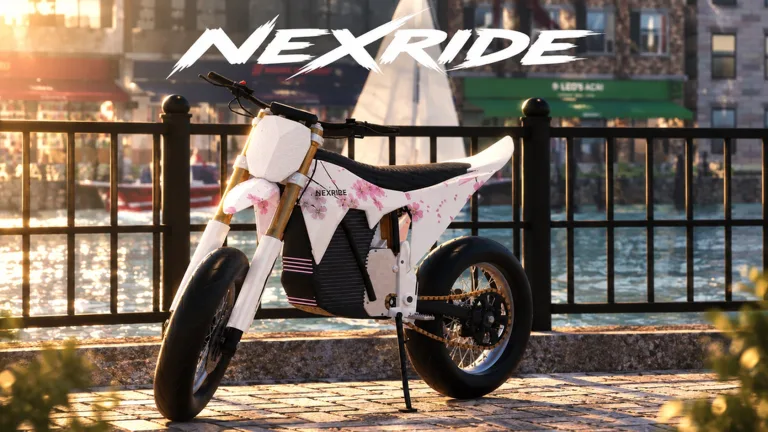
NexRide performance upgrades let you change your bike’s performance as you explore the city. Check sports mode before spending, because enabling it makes your bike faster. Getting more from NexRide performance upgrades also means earning cash, managing your charge, and keeping enough control to stay out of expensive trouble.
Bike customization is part of NexRide’s riding loop. You can upgrade performance, change your setup, and personalize your ride. Buying another bike also changes the riding experience: different bikes drive differently, so give yourself time to adjust when you switch.
Separate those choices before you spend. A riding mode, a performance upgrade, and a cosmetic option serve different purposes.
| Feature | What it does |
|---|---|
| Performance upgrades | Let you improve your bike’s performance |
| Bike setup customization | Lets you change your setup |
| Sports mode | Makes the bike faster when enabled |
| Different bikes | Provide different riding behavior |
| Paint and underglow | Add visual customization options through VIP |
Start by deciding what you want from your next ride. For more speed on your current bike, check sports mode. To change the bike itself, head to the customization location. To experience another bike’s handling, try riding your new purchase before making further decisions.
Keep the route in mind, too. NexRide’s city has working traffic, traffic lights, stop signs, and police chases. A faster bike still needs careful inputs around intersections.
Treat NexRide performance upgrades as part of your overall riding setup. Use the extra performance on roads where you can manage it, and slow down before a turn becomes a crash.
Turn On Sports Mode and Check Your Riding Setup
If your bike feels slow, check its riding mode before heading back to customize it. Sports mode increases speed, making it a useful setting to check early.
| Setting | Recommended value | Why it helps |
|---|---|---|
| Riding mode | Sports mode when you want more speed | The bike travels faster with this mode enabled |
Switch into sports mode, then give yourself room to get used to the bike. Avoid combining that adjustment with a wheelie through a busy intersection. Bikes can tip, and reckless riding can attract police attention.
Use a familiar stretch of road to judge the change. Ride it normally, pay attention to the bike’s behavior, and keep your inputs controlled. Make one setup change at a time so you can judge what you prefer without mixing several adjustments together.
Get moving before judging the bike
The basic riding sequence matters when you are getting started:
- Press 1 to equip your main key.
- Use the key on your bike.
- Click the kickstand to raise it.
- Start riding.
Once you are moving, check sports mode if speed is your immediate concern. Keep the distinction between preparing the bike to ride and changing how it performs.
For NexRide performance upgrades, the useful question is what you want to improve about your current ride. Start with the speed setting you already have, then move on to customization with a clearer goal.
Match speed to the street
Watch the road signs as closely as the bike. Stop at red lights and stop signs, and continue when the light turns green. Running a red light can start a police chase.
Ease off before intersections. That gives you room to follow the signals instead of turning every fast ride into another escape attempt.
Find Bike Customization and Manage Your Garage
Open your phone with T when you need to find bike services. The map can route you to the bike hub, where you can reach the bike customization location.
Use the phone’s navigation instead of riding around while your charge runs down. The bike stores also provide charging, so remember the location after your first visit.
| Destination or feature | How to access it | What you can do |
|---|---|---|
| Phone | Press T | Access the map and garage |
| Bike Hub | Find it on the phone map and start a route | Navigate toward bike customization |
| Bike stores | Travel to the bike store location | Customize bikes and charge your bike |
| Garage | Open it through your phone | Bring your bike back home and access a purchased bike |
To reach customization:
- Press T to open your phone.
- Open the map.
- Find the bike hub.
- Start a route to it.
- Follow the route while obeying traffic signals.
- Visit the bike customization location.
Once you arrive, focus on the setup change you came for. Keep your riding goal in mind rather than spending simply because you have reached the shop.
NexRide performance upgrades sit alongside broader customization, so decide whether your visit is about how the bike rides or how it looks. That keeps your spending connected to what you actually want to do next.
Remember charging and garage access
Charge your bike at the bike store when it needs power. Remembering that service is especially useful before heading out for another stretch of riding.
After buying a bike, use your garage to access it. Spend some time learning its behavior before pushing the speed: changing bikes can also change how the ride feels.
Keep this short checklist handy:
- Check sports mode when you want more speed.
- Use the phone map to reach bike customization.
- Remember the charging location.
- Use the garage to manage access to your bike.
Earn Cash for NexRide Performance Upgrades
Building a cash balance gives you more room to customize your ride and buy another bike. NexRide includes work, deliveries, riding income, and memecoin trading, while wheelies and police escapes add other earning opportunities.
Start with the code rewards available in October 2026. Enter each code exactly as shown because capitalization matters.
| Code | Reward | Status on October 23, 2026 |
|---|---|---|
200KVISITS | 3,000 Cash and 2x Cash for 15 minutes | Active |
100KVISITS | 2,500 Cash | Active |
Together, those codes provide 5,500 Cash, plus the temporary cash boost from 200KVISITS.
To redeem them:
- Open the in-game store.
- Select CODES at the top of the store menu.
- Enter a code in the ENTER CODE field.
- Select REDEEM.
Plan a riding session around the temporary boost. Redeem 200KVISITS when you are ready to ride, with your bike accessible and your route in mind.
Joining the game’s group also offers a 1,000-cash reward. Put those rewards toward your riding goals before deciding whether to spend Robux.
Use wheelies without sacrificing the ride
Wheelies earn money, and longer wheelies pay more. Practice them where you have space to maintain control.
During a police chase, prioritize escaping. Trying to stretch a wheelie while police are close adds another thing to manage when you already need to watch traffic and avoid collisions.
For funding NexRide performance upgrades, keep the earning activity connected to what you can control. Work and deliveries are available alongside riding, so use those activities when you want a break from chase attempts.
Weigh chase rewards against fines
Escaping police can pay around 400–600 cash. Getting caught can bring a fine, including a 200-cash penalty.
Those numbers matter when you are saving. A failed escape takes cash away from the balance you wanted to spend on your bike.
Avoid hitting police cars, watch your speed, and follow traffic signals when you want to keep riding without starting trouble. Choose a chase deliberately instead of stumbling into one on the way to customization.
Plan Your Spending Around Your Next Ride
Before spending on NexRide performance upgrades, decide whether your immediate goal is more speed, another bike, or a different setup.
Check sports mode for speed. Visit customization for setup changes. Save toward another bike when you want a different riding experience.
Keep some cash available for fines, especially if police escapes are part of your earning routine. Spending your whole balance before another chase leaves less room for a failed attempt.
Compare paid cash benefits carefully
NexRide sells two game passes with cash-related benefits:
| Game pass | Price | Included benefits |
|---|---|---|
| VIP | 499 Robux | VIP tag, +25% cash, a daily bonus, underglow, and VIP-only paint |
| 2x Cash | 299 Robux | Permanently doubles money earned from riding |
Read the benefits against how you play. The 2x Cash pass specifically doubles riding income. VIP combines a cash bonus with daily and cosmetic benefits.
Start with the free codes before considering either purchase. That gives you cash to use while you learn the bike services, explore the city, and decide which activities you enjoy.
Build a repeatable riding routine
Use a simple sequence:
- Access your bike and check its charge.
- Enable sports mode when you want extra speed.
- Earn cash through your chosen activity.
- Navigate to customization when you have a specific change in mind.
- Get comfortable with the resulting setup before pushing harder.
Keep your decisions tied to the ride ahead. NexRide performance upgrades are easier to plan when you know whether you are preparing for ordinary city riding, practicing wheelies, or attempting another police escape.
When you are ready to ride, play NexRide on Roblox and check your current bike’s mode before making your next purchase.
FAQ
How do I get started with NexRide performance upgrades?
Press T, open your phone map, and route to the bike hub to reach bike customization. Decide what you want to change before spending. If your immediate goal is more speed, check sports mode on your current bike.
How do I make my bike faster in NexRide?
Switch the bike into sports mode. This riding mode makes it faster. Give yourself space to adjust, watch traffic signals, and slow down before tight turns because bikes can tip.
Where can I customize and charge my bike?
Visit the bike stores at the bike customization location. Use your phone map to find the bike hub and start a route. You can customize bikes and charge your bike there.
Which codes give cash for bike purchases and upgrades?
As of October 23, 2026, 100KVISITS gives 2,500 Cash, while 200KVISITS gives 3,000 Cash and 2x Cash for 15 minutes. Open the store, select CODES, enter the code exactly, and select REDEEM.
Continue with
 NexRide Best Bike: Price, Upgrades, and Buying GuideFind your NexRide best bike with a 15,000 cash target, sports mode tips, charging help, and earning strategies. Plan the next upgrade before spending cash.
More in Bikes
NexRide Bike Setup: Customize, Charge, and Ride Faster
Get your NexRide bike setup ready with key controls, bike customization, charging locations, Sports mode tips, and cash rewards for your next city ride.
NexRide Dirtbikes: Update Dates and Riding Prep Guide
Get ready for NexRide dirtbikes with the October update dates, bike controls, customization tips, and ways to earn cash before heading out onto the trails.
NexRide Kickstand: How to Raise It and Start Riding
Raise the NexRide kickstand, use your main key, and get your bike moving. Learn startup steps, charging basics, garage controls, and riding tips today.
NexRide Main Key: How to Start and Ride Your First Bike
Use the NexRide main key to start your bike, raise the kickstand, and get riding. Learn the PC controls, garage access, charging stops, and riding basics.
Continue exploring
Join the community
Official channels for news, updates and player help: